Thursday, June 19, 2008

How to increase the size of thumbnails or filmstrip in microsoft windows xp

Its very simple, just downlaod and install the Tweak UI powertoy software from microsoft website

http://download.microsoft.com/download/f/c/a/fca6767b-9ed9-45a6-b352-839afb2a2679/TweakUiPowertoySetup.exe

This PowerToy gives you access to system settings that are not exposed in the Windows XP default user interface, including mouse settings, Explorer settings, taskbar settings, and more.

this Version 2.10 requires Windows XP Service Pack 1 or Windows Server 2003.

After installation, goto start>>programs>>Powertoys for Windows XP>>Tweak UI

With this software you can modify many settings that you never find the option.

Here is the screenshot to modify the size of thumnails.
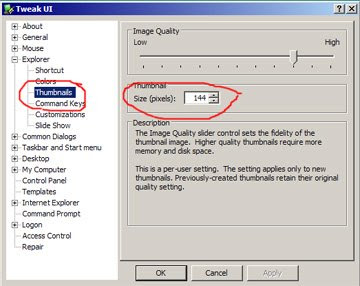


The default is 96, you can change it upto 256.

Enjoy!!

Tuesday, June 17, 2008

How to see clipboard in Microsoft Windows?

How to see clipboard in Microsoft Windows?

If you are trying to find out the location of clipboard in MS windows XP, you are at the right place.
There is no shortcuts given by Microsoft, you need to create it.

Please follow these steps

1. Double click My Computer
2. Double click WINDOWS folder
3. Double click system32 folder
4. Find clipbrd.exe in system32 folder
5. Select clipbrd.exe and right click
6. Now you can create the shortcut to the desktop or start menu, wherever you like.

You can also follow the alternate method provided by Microsoft website, click below
How to quickly open the ClipBook Viewer


PS: Don't do some experiments with system32 folder, you can copy or create short cut, never delete some files if you are not sure. If you delete some file, I am not responsible for this. It is also known as Microsoft clipbook viewer in English and Microsoft visualizzatore cartella appunti in Italian.

Feel free to write your comment.