Showing posts with label Microsoft. Show all posts

Tuesday, December 7, 2010

Solution to Windows 7 keeps on checking update or searching updates

Are you having one of the following problems related to Microsoft windows 7 update.
  • Windows 7 keeps on checking update or searching updates
  • Windows update stopped working
  • Microsoft windows does not install the pending updates
  • Windows does not show the installed updates.
  • No windows updates after you install IE9.
  • Windows7 failed to install updates many times.
  • Windows update hangs

Cause: The problem is due to the default registry size limit in windows 7 which is is 0x8000000 (134217728). You can increase the registry size limit by following steps

Solution:
  1. Open regedit (Run regedit)
  2. Then goto and modify the value
  3. HKEY_LOCAL_MACHINE\System\CurrentControlSet\Control
  4. Key: RegistrySizeLimit, Type: REG_DWORD, Value: 0x8000000 (134217728)
  5. Change the value: 0xFFFFFF (4294967295)
  6. Now reboot the system and check for the updates. You should be able to update


Related errors in CBS logs :
cbscore.dll problem
Failed to load the COMPONENTS hive from 'C:\Windows\System32\config\COMPONENTS' into registry key 'HKLM\COMPONENTS'. [HRESULT = 0x800705aa - ERROR_NO_SYSTEM_RESOURCES]
Failed to load WCP DLL. [HRESULT = 0x800705aa - ERROR_NO_SYSTEM_RESOURCES]
Failed to initialize the Core DLL:
Failed to initialize CBS Core. [HRESULT = 0x800705aa - ERROR_NO_SYSTEM_RESOURCES]
Failed to initialize Trusted Installer. [HRESULT = 0x800705aa - ERROR_NO_SYSTEM_RESOURCES]
Trusted Installer core was not initialized.
HRESULT (0x800736FD)

Friday, June 12, 2009

How to send multiple pages or images or complete file with microsoft fax console?

Microsoft fax console allows you to send and receive fax from your PC. YOu need to install the fax console before you can start sending the fax.

If you use the send fax wizard, you will not be send multiple page.

How to send many pages,
  1. Open the file with multiple pages you want to send.
  2. Go to print option (Control+P)
  3. Select fax option.
  4. Now follow the wizard.
You are done, you can see the preview of the fax before sending.

The same procedure can be followed for any file which can be printed in your printer.

Wednesday, May 13, 2009

Solution: rootnoverify (hd0,0), chainloader +1, NTLDR is missing problem in xp

I always run out of Disk space in my laptop. Recently I installed one application and rebooted the system and got the following error.

----------------
Booting 'Windows Xp home'

rootnoverify (hd0,0)
chainloader +1

NTLDR is missing
Press Ctrl+Alt+Del to restart
----------------

wow!! I was shocked to see this message as I was working I thought something went wrong, HHD failure or partition got corrupted.

Actually I have Fedora core and Win Xp installed in my Laptop, I read some forums and found that the problem could be due to dual operating system I have on my PC, but I could not understand why. Well having double OS helped me to backup my data, as I could access my NTFS partition from fedora.

I checked the partitions from the linux and everything was fine, After googling more I found that there is different problem. Since I always run out of space, the files of the newly installed softwares were written on fragmented hard disk. This problem was occurred because my MFT root folder was severely fragmented. If the MFT root folder contains many files, the MFT may become so fragmented that an additional allocation index is created. Because files are mapped alphabetically in the allocation indexes, the NTLDR file may be pushed to the second allocation index. When this occurs, I got the error message.

The I did exactly what was written on MS website, but the problem was to get the bootable floppy/CD/USB key with right boot.ini and NTLDR file. I tried with USB key and CD but was not successful at all, with USB I was getting error "No operating system found" I tried many combination but no Success.

The searching more and more I found this solution and workaround which was very easy to apply and finally I could boot my Xp..

The full method is described here

http://www.tinyempire.com/notes/ntldrismissing.htm

Do not forget to copy NTLDR and NTDETECT.COM files to your C:/ or windows home directory.

You can also try because most of the times this problem is cause due to roxio Easy media creator 9, 10 or 2009.

http://kb.roxio.com/search.aspx?URL=/content/kb/General%20Information/000061GN&PARAMS=set-locale=en

Additional help
http://support.microsoft.com/kb/320397
http://support.microsoft.com/kb/305595/

Thursday, June 19, 2008

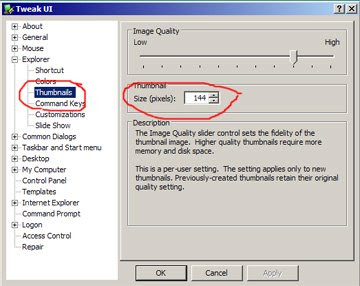
How to increase the size of thumbnails or filmstrip in microsoft windows xp

Its very simple, just downlaod and install the Tweak UI powertoy software from microsoft website

http://download.microsoft.com/download/f/c/a/fca6767b-9ed9-45a6-b352-839afb2a2679/TweakUiPowertoySetup.exe

This PowerToy gives you access to system settings that are not exposed in the Windows XP default user interface, including mouse settings, Explorer settings, taskbar settings, and more.

this Version 2.10 requires Windows XP Service Pack 1 or Windows Server 2003.

After installation, goto start>>programs>>Powertoys for Windows XP>>Tweak UI

With this software you can modify many settings that you never find the option.

Here is the screenshot to modify the size of thumnails.


The default is 96, you can change it upto 256.

Enjoy!!

Tuesday, June 17, 2008

How to see clipboard in Microsoft Windows?

How to see clipboard in Microsoft Windows?

If you are trying to find out the location of clipboard in MS windows XP, you are at the right place.
There is no shortcuts given by Microsoft, you need to create it.

Please follow these steps

1. Double click My Computer
2. Double click WINDOWS folder
3. Double click system32 folder
4. Find clipbrd.exe in system32 folder
5. Select clipbrd.exe and right click
6. Now you can create the shortcut to the desktop or start menu, wherever you like.

You can also follow the alternate method provided by Microsoft website, click below
How to quickly open the ClipBook Viewer


PS: Don't do some experiments with system32 folder, you can copy or create short cut, never delete some files if you are not sure. If you delete some file, I am not responsible for this. It is also known as Microsoft clipbook viewer in English and Microsoft visualizzatore cartella appunti in Italian.

Feel free to write your comment.