Google Drive
Make sure the link is shared, and it will look something like this:
https://drive.google.com/open?id=FILEID&authuser=0
Then, copy that FILEID and use it like this
wget --no-check-certificate 'https://docs.google.com/uc?export=download&id=FILEID' -O FILENAME.EXT
DropBox
When you share a file in Dropbox, the link will look like
https://www.dropbox.com/s/xvuu7a8syeaur0n/FILENAME.EXT?dl=0
replace dl=0 to dl=1 then use the following command to download using wget from Dropbox
wget -O FILENAME.EXT "https://www.dropbox.com/s/xvuu7a8syeaur0n/FILENAME.EXT?dl=1"
Showing posts with label google. Show all posts
Showing posts with label google. Show all posts
Wednesday, May 23, 2018

Tuesday, April 21, 2009
How to change the interface or display language of Knol beta?
Recently Google started knowledge sharing site where one cane share, edit their knowledge to the world.
When you land on this page, by default, you see the language of the country from where you are accessing knol. For example, you are Japanese and want to access knol in Germany, you will see the interface in Deutsch. Which makes it difficult to access it.
You can change the language after login knol with your Google or Gmail email login and password.
Then go to My Profile >> Preferences >> Display language
Here you can set the language you want. As long as you are logged in, you will see the. You can also translate Knol into other languages like Hindi, African etc.
Earn money with knol, Click here
Have some problems, leave your comment.
Knol vs blogger and adsense earnings
Knol and blogger both owned by Google and both comes with adsense and has good earning potential.
Knol is somewhat similar to wiki, where one shares the knowledge to the world that can be edited by the experts or other users. so simply one can say that Knol is a unit of knowledge which is user generated site. That means the articles submitted by users are not edited, fact-checked, or screened before they post.
On the other hand, blogger is also information sharing but has some restrictions on commenting editing the published information.
The most important is the earning, there are many who makes lot of dollars through adsense by blogging. Well, if you have some knowledge and want to share, then knol is good option which can also be integrated with your adsense account.
I am blogger since 2006 and I started my knol today.., what do you think about knol? Please leave your comment.
Refer:
http://knol.google.com/
http://blogger.com/home
http://www.google.com/adsense/
Wednesday, April 8, 2009
Watch and share YouTube and Google videos from Google chat while chatting
After integrating the introducing voice and video chat directly from Gmail, with desired audio and video settings, Google also includes more fun options while chatting.
Now you can also watch and share the YouTube videos or Google videos with your friends while chatting. That’s interesting.

While chatting, if you want to share a romantic song to your girl/boy friend, just copy the link of the song from Google video or YouTube and past it. You are done. However you need to play the video. You can see the screenshot of the video "Ab Toh Hai Tumse (Amitabh Bachchan & Jaya Bhaduri)" shared with my friend.
Enjoy...
Wednesday, March 4, 2009
how to clear, delete or remove download history in Google chrome
There is no shortcut in Google chrome to delete the entire download history, however you can delete the individual the individual download from the history.
This blog will describe the method to remove or delete the whole download history from Google chrome downloads
To clear whole download history
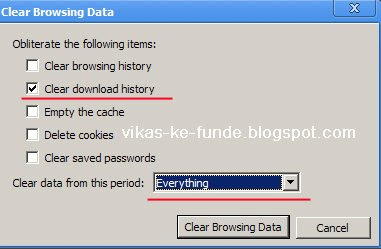
Screen Shot
 Now you will not be able to see your download history.
To remove a specific download from the history
Please note that these actions doesn't remove the actual file from your computer.
Ref: http://www.google.com/support/chrome/bin/answer.py?hl=en&answer=95607
This blog will describe the method to remove or delete the whole download history from Google chrome downloads
To clear whole download history
- Click the Tools menu.
- Select Clear browsing data.
- In the 'Clear Browsing Data' dialog box, select the 'Clear download history' checkbox and uncheck rest, if you do not want to delete the browsing history, cookies, saved passwords and empty the cache.
- In clear data period, select everything, if you want to delete the whole history, you can also find other options like, last week, last day etc.
- Click the Clear Browsing Data button.
Screen Shot
Now you will not be able to see your download history.To remove a specific download from the history
- Click the Tools menu, Select Downloads. (Shortcut Ctrl+J.)
- Right click the downloaded file you want to remove
- Select Remove, the file will be removed.
Please note that these actions doesn't remove the actual file from your computer.
Ref: http://www.google.com/support/chrome/bin/answer.py?hl=en&answer=95607
Subscribe to:
Posts (Atom)